


How an Uplynk ad break works in a live stream
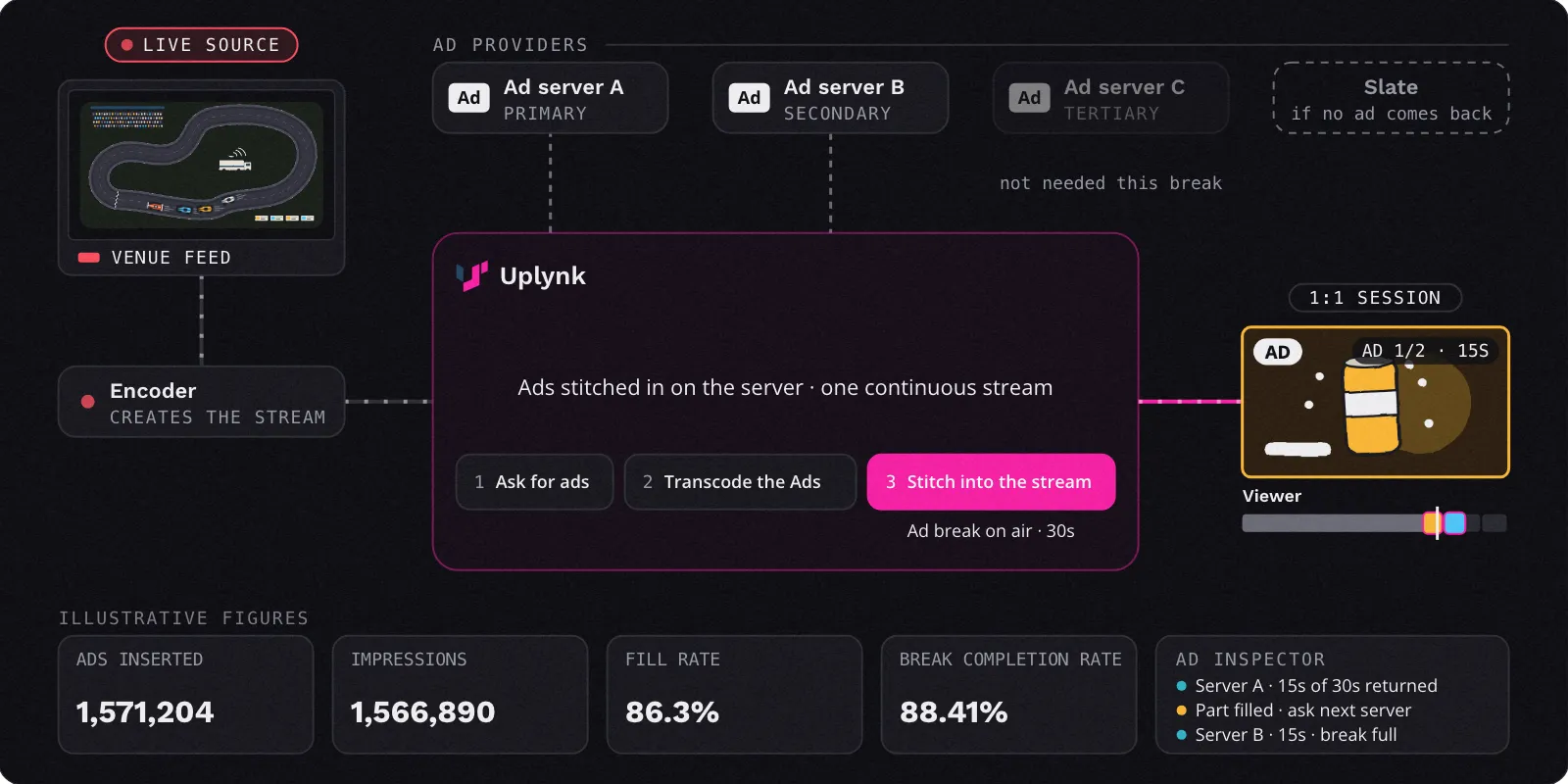
Step 1 of 6
The live feed arrives
Your live stream reaches Uplynk with a cue that an ad break is coming. The cue tells Uplynk when the break starts and how long it runs.
Step 2 of 6
Uplynk asks the primary ad server
Before the break, Uplynk asks your primary ad provider for ads. Your ad providers are listed in priority order: a primary, then secondaries. Ads are fetched ahead of the break, so they’re ready on time.
Step 3 of 6
Partly filled? Ask the next one
If the primary server fills only part of the break, Uplynk asks the next ad provider to fill the rest, and keeps going until the break is full. If no server fills it, a slate plays.
Step 4 of 6
Ads are prepared to match
Uplynk transcodes each ad to match the live stream, so the break plays at the same quality as the program around it.
Step 5 of 6
Stitched into the stream
The ads are stitched into the viewer’s stream on the server, in a 1:1 session. The viewer sees one continuous stream: the program, the ads, then the program again, with no separate ad player and no buffering.
Step 6 of 6
Every ad is counted
Uplynk reports ads inserted, impressions, fill rate and break completion, so you can see how each break performed.
Read the full explanation
- The live feed arrives. Your live stream reaches Uplynk with a cue that an ad break is coming. The cue tells Uplynk when the break starts and how long it runs.
- Uplynk asks the primary ad server. Before the break, Uplynk asks your primary ad provider for ads. Your ad providers are listed in priority order: a primary, then secondaries. Ads are fetched ahead of the break, so they’re ready on time.
- Partly filled? Ask the next one. If the primary server fills only part of the break, Uplynk asks the next ad provider to fill the rest, and keeps going until the break is full. If no server fills it, a slate plays.
- Ads are prepared to match. Uplynk transcodes each ad to match the live stream, so the break plays at the same quality as the program around it.
- Stitched into the stream. The ads are stitched into the viewer’s stream on the server, in a 1:1 session. The viewer sees one continuous stream: the program, the ads, then the program again, with no separate ad player and no buffering.
- Every ad is counted. Uplynk reports ads inserted, impressions, fill rate and break completion, so you can see how each break performed.
Why server-side ad insertion matters
No Buffering at the Break
Ads are part of the stream itself, so the player never has to stop, switch, or load a separate ad player.
Harder to Block
Because ads arrive inside the stream, browser ad blockers cannot pick them out the way they can with player‑side ads.
One Ad per Viewer
Every viewer gets an ad chosen for them, even when millions of people are watching the same live stream.
Fewer Empty Breaks
If one ad server only partly fills a break, Uplynk asks the next ad provider for the rest, and a slate covers anything left.
What is server-side ad insertion (SSAI)?
Server-side ad insertion, also called dynamic ad insertion or ad stitching, places ads into a video stream on the server before it reaches the viewer. The viewer’s player receives one continuous stream with the ads already in it. Uplynk provides SSAI through SmartPlay for live, linear, FAST and on-demand streaming.
How is SSAI different from client-side ad insertion?
With client-side insertion, the viewer’s device pauses the program and loads ads from a separate ad player, which can cause buffering and is easy for ad blockers to stop. With SSAI, the ads are stitched into the stream on the server, so playback stays smooth and the ads play like the rest of the program.
Can every viewer see a different ad?
Yes. Uplynk builds a personalized stream for each viewer session, so two people watching the same live event can see different ads based on their region, device, or advertising profile.
What happens if an ad server can’t fill the whole break?
Uplynk works through your ad providers, a list of ad servers in priority order. It asks the primary server for ads before the break. If that server returns nothing or fills only part of the break, Uplynk asks the next server to fill the remaining time, and keeps going until the break is full or every server has been tried. If no server fills it, a slate plays.
How does SSAI work for on-demand (VOD) content?
For on-demand content, Uplynk requests ads when the viewer loads the video, rather than before a live break. Because Uplynk serves ads on a per-session basis, different viewer sessions can receive different ads.
Does Uplynk work with my existing ad server?
Uplynk SmartPlay supports multiple ad decisioning systems, so you can connect the ad servers you already use and set up more than one as ad providers.
Explore More of SmartPlay
See how server-side ad insertion fits into the rest of the Uplynk platform.